There is a classic scenario where we need to shift our system from batch level status tracking to granular single task error tracking. Doing this improves both maintainability and observability.
To achieve this goal, we can let the Data Object carry the target state itself instead of passing the state uniformly through method parameters. This keeps code changes minimal and maintains an elegant structure.
Current Situation
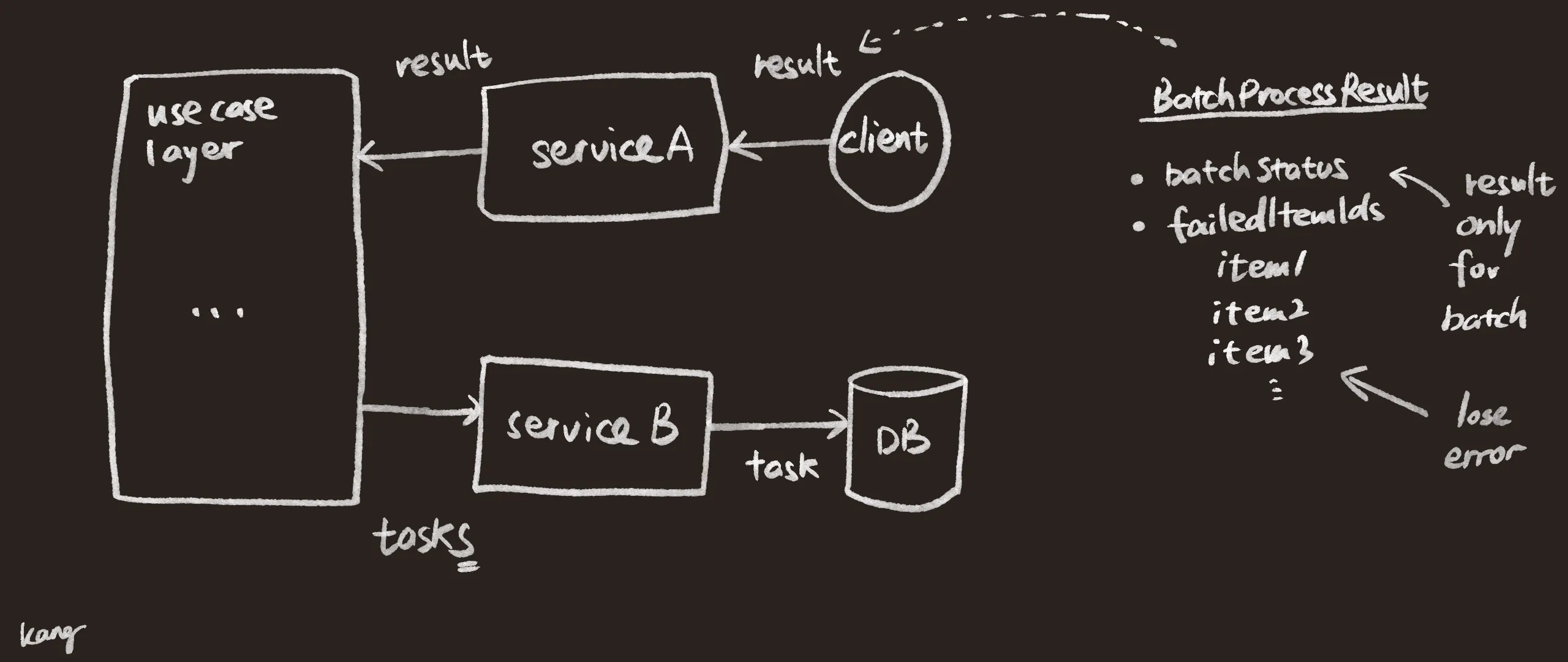
- Fetching tasks: The use case layer directs the service layer to pull pending tasks from the database in batches.
- Fetching data and calling: The infrastructure layer sends requests where each request carries the batch payload.
- State transition: The service layer wraps the results into a custom
BatchStatuslikeSUCCESS,PARTIAL_SUCCESSorFAILEDbased on the external service response or thrown exceptions. - Batch update: The use case layer categorizes this batch of tasks based on the
BatchStatusand iteratively calls Repository layer methods to update the database state.
Core Objective
We want to improve the observability and granular troubleshooting capabilities of our services during batch task processing.
When an underlying service call fails, the system should do more than just mark the task with a generic FAILED or RETRY status. It should accurately propagate native underlying error details such as HTTP status codes, specific Client Error Codes and Service Response Messages. These details should then be persisted into the database record of each specific task.
Encountered Issues
Under the current mechanism, the service suffers from a severe Context Dropping issue:
- Information disconnect: The underlying infrastructure captures error codes and messages but these debug details are merely printed to the logs and then discarded.
- Flat state: The service layer only wraps a bare
BatchStatusand a collection of affected task IDs. - High debugging costs: All failed tasks look exactly the same in the database. If developers want to find the root cause for a specific task they have to take the task ID and search through the log system manually.
Code Example
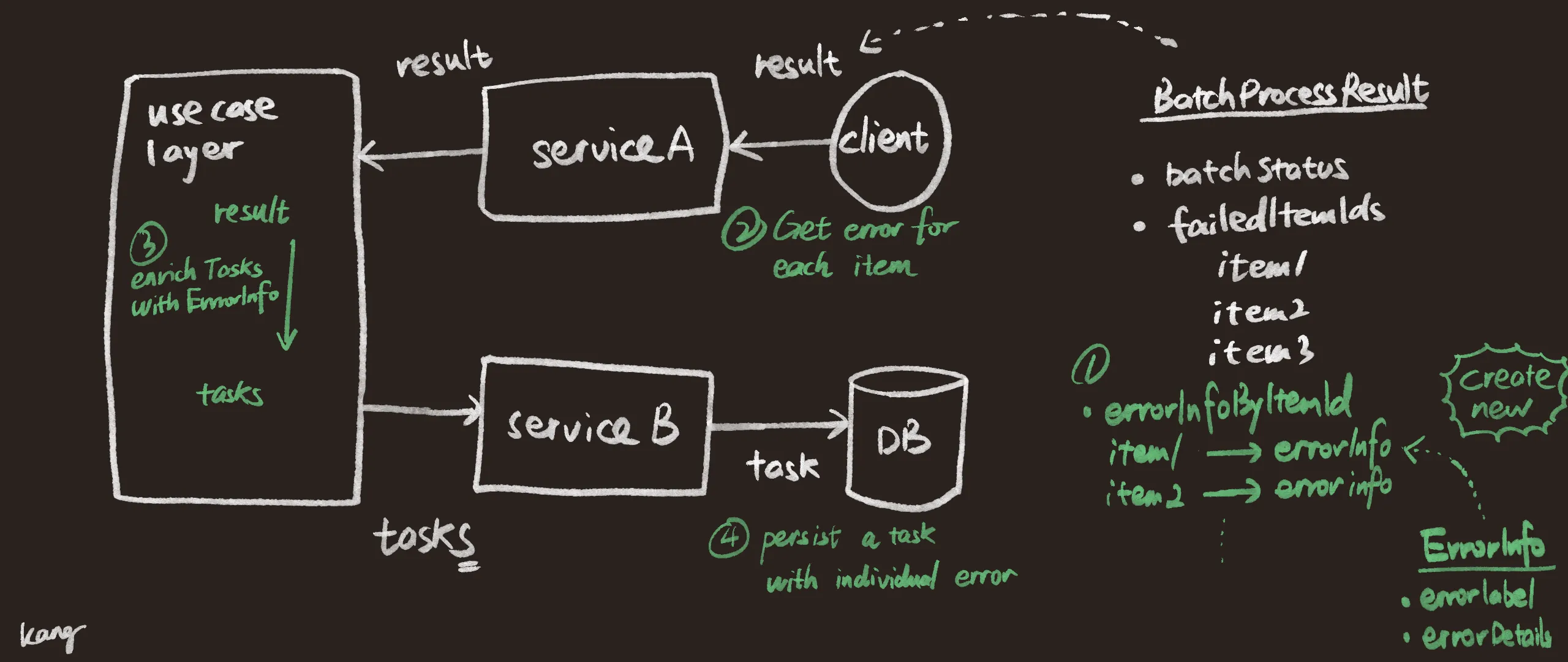
We need to fetch the Task from the persistence layer, request the external Client to get the outcome, pass the Result containing the success or error details back to the Task and finally update the persistence layer.
Step 1: Equip BatchProcessResult with Error Carrying Capability
Assume we currently have a BatchProcessResult that contains a unified BatchStatus after calling the external Client which includes multiple ItemIds.
Previously we could only return a simple BatchStatus. Now we want to record the specific details of each item. To do this we introduce a new ErrorInfo record and establish a mapping between the item ID and the error information inside the Result.
// 1. Add record to encapsulate error details for each item
public record ErrorInfo(
    String failedReason,
    String errorLabel,
    String errorDetails
) {}

// 2. Refactor the batch processing return result class
public class BatchProcessResult {
    // Previously only had the Batch result
    private BatchStatus batchStatus;
    private final Set<String> failedItemIds = new HashSet<>();

    // [New] Used to store what error occurred for which Item
    private final Map<String, ErrorInfo> errorInfoByItemId = new HashMap<>();

    // omitted getters and setters

    public void addFailedItemWithError(String itemId, ErrorInfo errorInfo) {
        failedItemIds.add(itemId);
        errorInfoByItemId.put(itemId, errorInfo);
    }

    public ErrorInfo getErrorInfo(String itemId) {
        return errorInfoByItemId.getOrDefault(itemId, null);
    }
}
Step 2: Catch Exceptions at the Lowest Level
At the location where the network call is initiated at the infrastructure or service layer, we must change the old habit of simply printing logs and returning a vague FAILED status. We need to capture HTTP status codes, Messages returned by third party systems and other details. We then wrap them into ErrorInfo and pass them upwards.
// Service layer interacting with client to get result
public BatchProcessResult processBatch(String clientId, Set<String> itemIds) {

	RemoteClient client = ClientRegistry.get(clientId);
	if (client == null) {
		// [New] If client fails then all items in this batch share a uniform error
		ErrorInfo errorInfo = new ErrorInfo(
			"CLIENT_CONFIG_ERROR",
			"NO_CLIENT",
			"more details"
		);
		return createBatchResultWithError(BatchStatus.FAILED, itemIds, errorInfo);
	}

	try {
		Response response = client.sendItems(itemIds);

		if (response == null) {
			return createBatchResult(BatchStatus.SUCCESS);
		}
		// [New] Can return a BatchProcessResult containing different item errors
		return createBatchResultForPartialSuccess(itemIds, response);
	} catch (ClientRequestException e) {
		// Further enrich the client error return information
		ErrorInfo errorInfo = new ErrorInfo(
			"CLIENT_REQUEST_ERROR",
			e.getErrorCode(),
			e.getMessage()
		);
		return createBatchResultWithError(BatchStatus.RETRY, itemIds, errorInfo);
	} catch(Exception e) {
		ErrorInfo errorInfo = new ErrorInfo(
			"SYSTEM_ERROR",
			"UNKNOWN_EXCEPTION",
			e.getMessage()
		);
		return createBatchResultWithError(BatchStatus.UNKNOWN, itemIds, errorInfo);
	}
}
Step 3: Orchestrate in the Use Case Layer and Stitch Data Before Persistence
This is the step to integrate or align the task and the result. In the use case layer after getting the BatchProcessResult from the lower levels, we do not throw it directly to the Repository. Instead we enrich the task information based on the result by assigning the error details passed from below to the Task entity according to the itemId via enrichTasksWithErrorInfo().
// Use case layer responsible for orchestrating services
public void processBatchTasks(String clientId) {
	// Get tasks or Entities
	List<Task> tasks = taskService.getNextTasks();
	if (tasks.isEmpty()) return;

	Set<String> itemIds = extractItemIds(tasks);

	BatchProcessResult result = batchProcessor.processBatch(clientId, itemIds);

	// Since batch succeeded with no errors there is no need to bind to tasks
	if (result.getBatchStatus() == BatchStatus.SUCCESS) {
        taskService.updateTasks(tasks, TaskStatus.SUCCESS);
        return;
    }

    // [New] Before persisting stitch the error details from result onto the tasks
    enrichTasksWithErrorInfo(tasks, result);

    // Dispatch TaskStatus based on BatchStatus
    switch (result.getBatchStatus()) {
        case PARTIAL_SUCCESS -> handlePartialSuccess(tasks, result); // Extra handling for failed items needed
        case RETRY -> taskService.updateTasks(tasks, TaskStatus.RETRY);
        default -> taskService.updateTasks(tasks, TaskStatus.FAILED);
    }
}

// Method to stitch task and result together
private void enrichTasksWithErrorInfo(List<Task> tasks, BatchProcessResult result) {
    for (Task task : tasks) {
        ErrorInfo errorInfo = result.getErrorInfo(task.getItemId());
        if (errorInfo != null) {
            task.setFailedReason(errorInfo.failedReason());
            task.setErrorLabel(errorInfo.errorLabel());
            task.setErrorDetails(errorInfo.errorDetails());
        }
    }
}
Step 4: A Clean Service Layer for Persistence
This service layer can focus solely on processing task related information without being polluted by details like failedReason from the result.
// 1. The current Service layer update method becomes extremely clean
public void updateTasks(List<Task> tasks, TaskStatus status) {
    // tasks already contain errorLabel and errorDetails so Repository will naturally flush them to DB upon update
    // Here we do final processing based on TaskStatus
    switch (status) {
        case SUCCESS -> taskRepository.deleteTasks(tasks);
        case FAILED -> handleFailed(tasks);
        default -> handleRetry(tasks);
    }
}

// 2. Task entity class prepared to receive this data
@Entity
@Table(name = "tasks")
public class Task {
    @Column(name = "error_label", length = 255)
    private String errorLabel;

    @Column(name = "error_details", length = 255)
    private String errorDetails;

    // omitted code
}
Conclusion
By introducing ErrorInfo as an additional Context carrier we decouple the lifecycles of capturing exceptions and persisting exceptions. The bottom layer only needs to record truthfully and the service and use case layers simply follow the map to assign values.
This ensures the single responsibility of methods and modules while greatly enhancing the observability of the system in the production environment.
Disclaimer: The code examples provided are simplified and generalized for educational purposes, focusing on architectural patterns rather than specific project implementation.